Through July 11, five Mets batters who have been in the batters box for at least 50 pitches have hit at least .300 led by Jeff McNeil, who is hitting .367. Just missing the cutoff is Dominic Smith, who has the highest SLG (.595).
Four Mets hitters are below the Mendoza line. Tied for the lowest batting average at .143 are Michael Conforto and Jonathan Villar, and though Villar’s faced fewer than half as many pitches as Conforto his SLG is more than double Conforto’s (.571 vs. .250).
The luckiest batter is Luis Guillorme, whose BA is 94 points higher than his xBA; whereas, the unluckiest batter is Pete Alonso. His BA is 69 points lower than his xBA.
Batting stats of Mets who have been at the plate for at least 50 pitches thru July 11
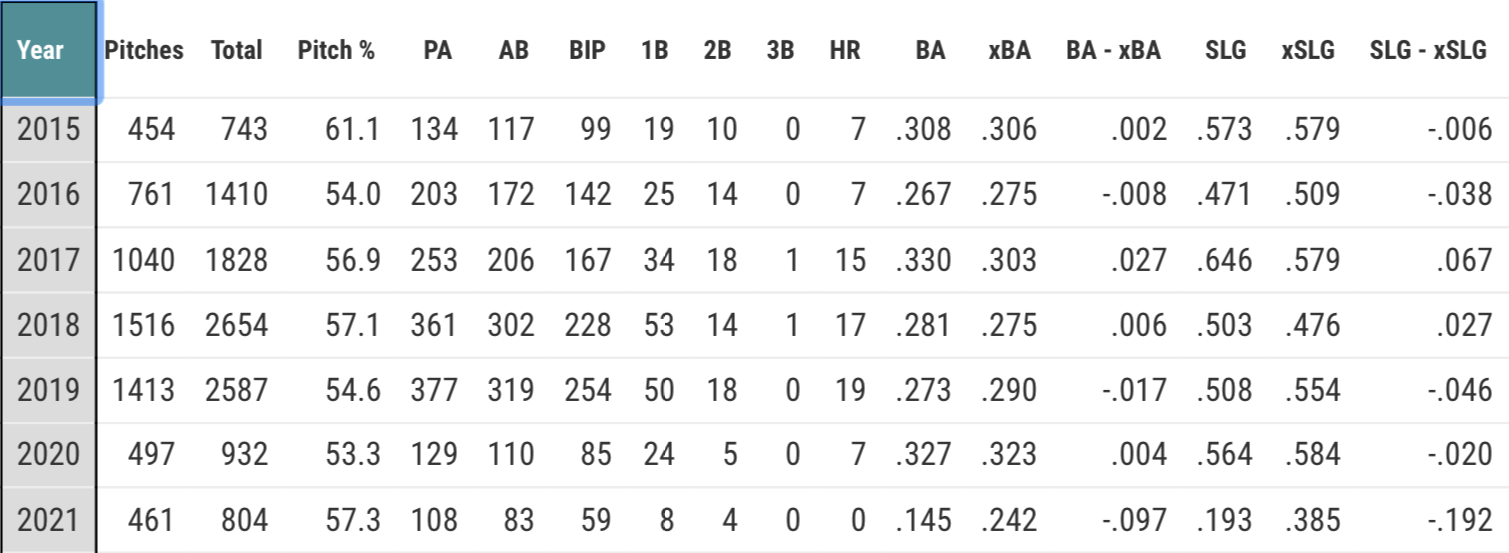
This season Michael Conforto has played only 51 games because of a right hamstring injury; however, in those games he has hit only .195 with an an SLG of .277 and an OBP of .342. His primary problem has been to get on base when the pitch is a fastball.
Against fastballs his batting average is .145. However, his xBA is 97 points higher, so Lady Luck has not been on Conforto’s side. Further, when he has put the fastball in play, which he has done 59 times, he has hit only four doubles and no home runs, resulting in an SLG of .193, 97 points lower than the xSLG of .385.
Against breaking balls and off-speed pitches he has had better luck, hitting .250 (xBA = .247).
Before this season, never hit less than .267 against fastballs, a pitch against which in 2020 he hit .327.
The latest feature added to Baseball Savant focuses on one of baseball’s most exciting plays: the home run. However, its creator, Daren Willman, tweeted, “Not all home runs are created equal.”
Not all home runs are created equal… Check out our new @statcast leaderboard for home runs. Click each player row and it lets you see which home runs would go out if it was hit at another stadium. https://t.co/u3mWUxlAVKpic.twitter.com/HRHFnQAMeA
The leaderboard’s startup screen shows all those batters in 2020 who hit at least one long ball that would have been a home run in at least one of Major League Baseball’s 30 ballparks.
On August 9, before any of the day’s games have been played, Yankees slugger Aaron Judge is Major League Baseball’s home run leader with eight. In the Home Runs Leaderboard, if you click anywhere on a player’s row except on his name, details on all his homers in the season you choose will appear, each homer listed on a separate row.
Click on Judge’s row. Below his name should beS a table showing those ballparks where each long ball that Judge hit on the given date will be a homer. For example, on August 8 in Tampa Bay, the first long ball that Judge hit (against Sean Gilmartin) would have been a four-bagger in every ballpark, but the second long ball he hit (against Nick Anderson) would have been a homer in only 18 parks — video.
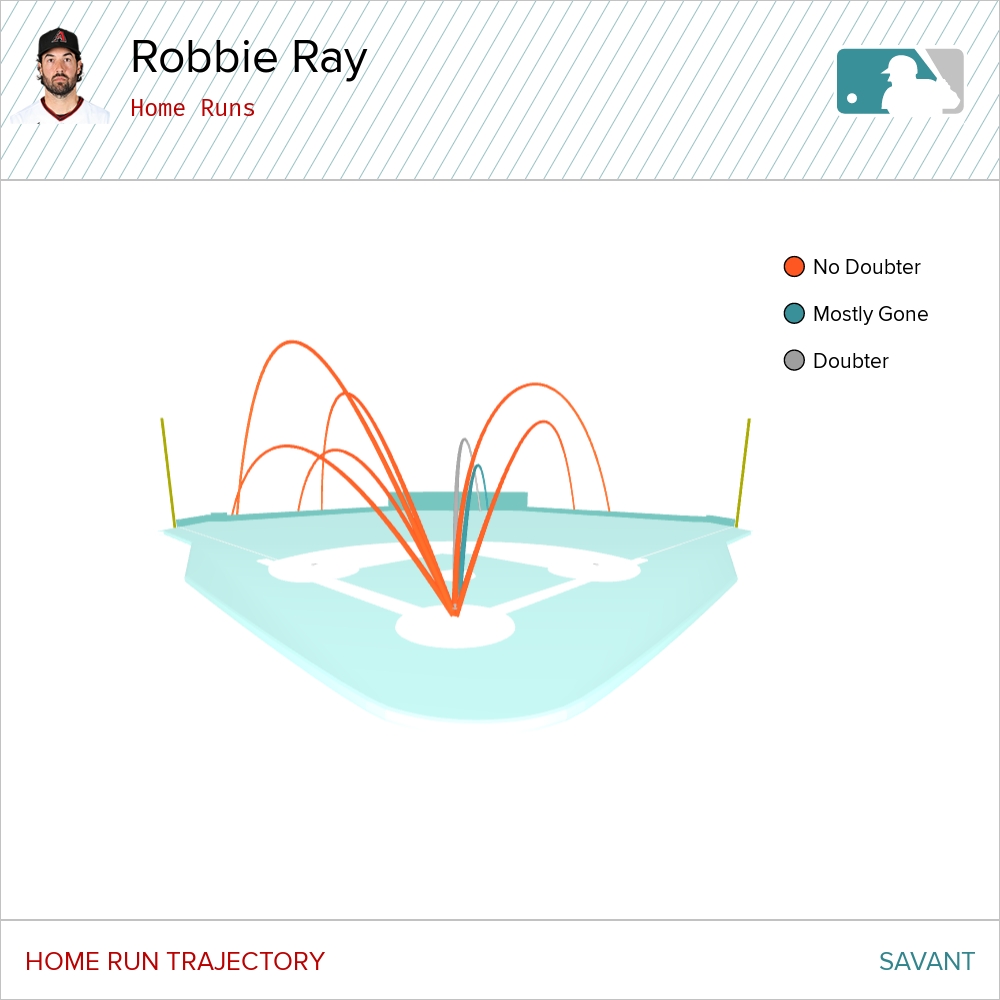
Therefore, for a long ball to qualify for (be included in) the Home Runs Leaderboard it must have been able to be a home run in at least one MLB stadium even if it was not a homer in the ballpark in which it was hit. Those batted balls are labelled as “Doubters,” “Mostly Gone,” or “No Doubters.”
If a batted ball would be a homer in fewer than 8 ballparks, it is a “doubter.”
If it would be a homer in 8 to 29 parks, it is “mostly gone.”
If would be a home run in every stadium, it is a “no doubter.”
That is why if you sum those three columns (“Doubters,” “Mostly Gone,” “No Doubters”) the total could be less than what is in the “Actual HR” column, which is the total number of homers the player hit, as occurs with Fernando Tatis Jr.’s numbers. He had six actual homers, but one “doubter,” three “mostly gone,” and six “no doubters.”
Finally, home run data is available for batters, pitchers, and teams for both 2019 and 2020.
Here is a sample of the kinds of questions that Savant’s Home Runs Leaderboard can answer.
Which player’s has the most “could-be” homers that could only be a home run in one stadium?
This is fascinating. Only 3 batted balls from Kris Bryant could have been a home run. And each of those would only be a HR in exactly 1 park.
Which Mets’ player has hit the most actual and “almost” homers so far in 2020? Notice that one of Davis’ “homers” was a non-homer. I label that one a “Could Be” homer.
In 2020, which pitcher have given up the most “no doubters?”
The Home Runs Leaderboard is a great resource with eye-catching visuals for statistically-minded baseball fans. One thing that could make it even better is if you could get team data by both division and league. For example, now if I select “Mets” and “Pitchers,” I only get the results for the qualifying Mets pitchers.
Every year since 1956 at least one pitcher has won the Cy Young Award starting with the Brooklyn Dodgers’ Don Newcombe. Many questions can be asked. How many pitchers won the award more than once? Which pitchers achieved that feat? Who won it the most times?
In this post, I focus on just one question: How many players won the Cy Young Award? I will share how I got the answer using the R programming language. I will also be using both RStudio and Sean Lahman’s Baseball Database, an excellent resource. A basic familiarity with both R, dplyr, and RStudio is assumed. (Note: As you progress through this post, have RStudio open.)
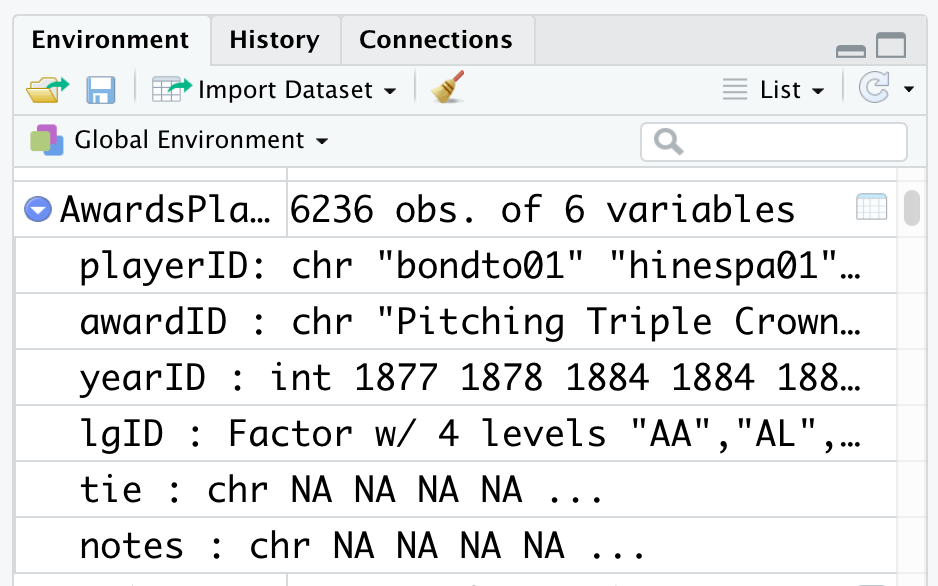
The database contains multiple files in table format. The table containing the player awards data is AwardsPlayers.RData. It has six variables:
playerID       Player ID code
awardID        Name of award won
yearID         Year
lgID           League
tie            Award was a tie (Y or N)
notes          Notes about the award
What AwardsPlayers.RData does not have are the players’ names though it has each Player’s ID. Their names are in People.RData. The People table contains 24 variables. In the partial display of its variables, notice that it too contains playerID.
playerID       A unique code asssigned to each player.
birthYear      Year player was born
birthMonth     Month player was born
birthDay       Day player was born
birthCountry   Country where player was born
birthState     State where player was born
birthCity      City where player was born
nameFirst      Player's first name
nameLast       Player's last name
weight         Player's weight in pounds
height         Player's height in inches
bats           Player's batting hand (left, right, or both)
throws         Player's throwing hand (left or right)
Fortunately, the playerID field links together the data in the tables.
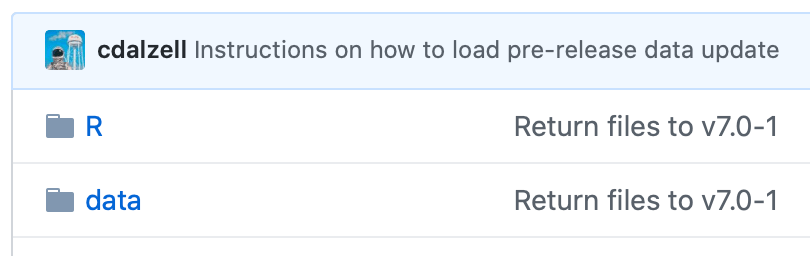
For this tutorial, you need to download from Lahman’s database the “2019 – R Package“. When the webpage appears, click “data.”
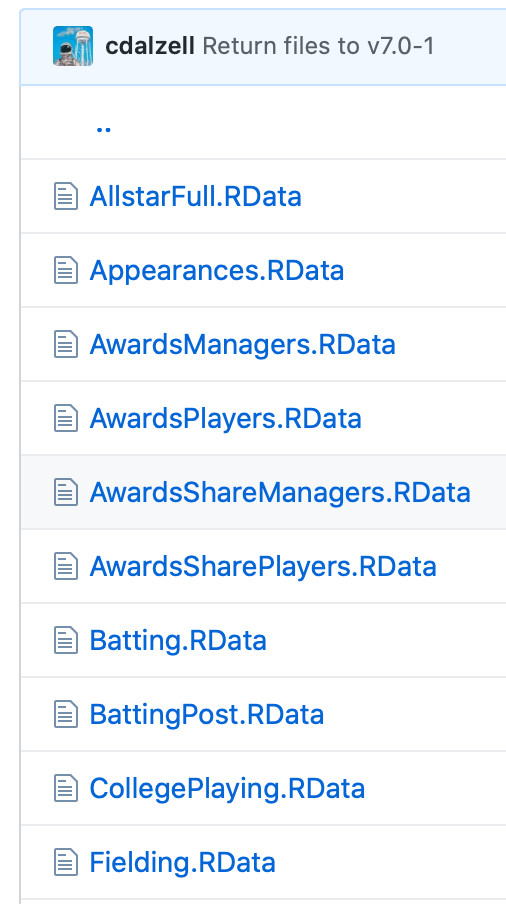
You will see a list of downloadable files. The files are in RData format, a format created for use in R. For this tutorial, download these two files: AwardsPlayers.RData and People.RData. The latter is not shown in the image below, which contains a partial file list.
After you click AwardsPlayers.RData, what is shown below will appear. Click View Raw. The file will download to your device. (Note: The way I show you to do something in this tutorial is often not the only way to do it.)
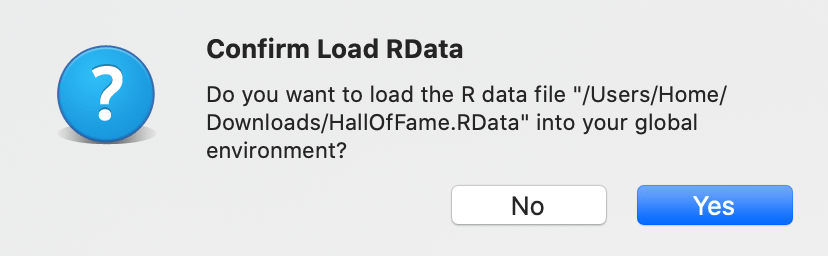
Click the downloaded file, which in this case is AwardsPlayers.RData. On my Mac, it downloaded into the Downloads folder.
When this appears, click Yes.
This should appear in your RStudio Console:
load(“/Users/Home/Downloads/AwardsPlayers.RData”
Here is how the AwardsPlayers.RData looks in RStudio’s Global Environment. It is now available for you to work on.
Now, in RStudio the two downloaded tables are R data frames. Next, I created an R Markdown file and made copies of both data frames.
AP <- AwardsPlayers
P <- People
Merge AP and P into a new data frame: AP_P. The column common to both, playerID, serves as the link.
AP_P <- merge(AP, P, by="playerID")
View the merged data frame’s variables.
glimpse(AP_P)
To view the data, while in the Console type
View(AP_P).
Activate the Tidyverse library, reduce the number of columns, and display the last 10 rows. Note: If you have not used it before, you may need to install it using the R code on the next line.
Select five columns in AP_P, and display the last 10 rows in AP_P.
nameFirst<chr>
nameLast<chr>
playerID<chr>
yearID<int>
awardID<chr>
6227
Ryan
Zimmerman
zimmery01
2010
Silver Slugger
6228
Ryan
Zimmerman
zimmery01
2011
Lou Gehrig Memorial Award
6229
Ryan
Zimmerman
zimmery01
2009
Silver Slugger
6230
Richie
Zisk
ziskri01
1981
TSN All-Star
6231
Richie
Zisk
ziskri01
1974
TSN All-Star
6232
Barry
Zito
zitoba01
2012
Hutch Award
6233
Barry
Zito
zitoba01
2002
Cy Young Award
6234
Barry
Zito
zitoba01
2002
TSN Pitcher of the Year
6235
Barry
Zito
zitoba01
2002
TSN All-Star
6236
Ben
Zobrist
zobribe01
2016
World Series MVP
The next step is to combine the nameFirst and nameLast columns in a new column, fullname. The paste function automatically inserts a space between the names.
In this table only the last eight observations are shown.
Go into the View window and set the settings you see below in the first row. Notice that the last year for the Cy Young Award is 2017, thus two years are missing.
Partial screenshot of View window
Add the missing data to the AP dataset.
AP <- add_row(AP, playerID = "degroja01", awardID = "Cy Young Award", yearID = 2018, lgID = "NL", tie = "NA", notes = "P")
AP <- add_row(AP, playerID = "snellwa01", awardID = "Cy Young Award", yearID = 2018, lgID = "AL", tie = "NA", notes = "P")
AP <- add_row(AP, playerID = "degroja01", awardID = "Cy Young Award", yearID = 2019, lgID = "NL", tie = "NA", notes = "P")
AP <- add_row(AP, playerID = "verlaju01", awardID = "Cy Young Award", yearID = 2019, lgID = "AL", tie = "NA", notes = "P")
AP <- add_row(AP, playerID = "verlaju01", awardID = "TSN All-Star", yearID = 2019, lgID = "AL", tie = "NA", notes = "P")
AP <- add_row(AP, playerID = "snellwa01", awardID = "TSN All-Star", yearID = 2018, lgID = "AL", tie = "NA", notes = "P")
Exercise: Update the AP_P data frame with the new data added to the AP dataset.
How many players won the Cy Young Award? After piping what is in the AP_P data frame to the select function, we filter it to limit the observations just to those players who won the Cy Young Award. That result is then sorted (in ascending order) and the number of observations in the awardID column are counted.



 Bats and Stats