Statcast Detective: Top High-Ball Pitchers

In 2018, Dave Sheinin wrote about a hitting change in Major League baseball. More hitters, he said, were becoming “becoming launch-angle disciples.”

More batters are focusing not only on hitting the ball hard, but hitting the ball high into the air. The average launch angle — the angle at which the ball flies after being hit — rose from 10.5 degrees in 2015 to 11.5 degrees in 2016.

Dave Sheinin — https://www.washingtonpost.com/graphics/sports/mlb-launch-angles-story/

To counter that change, pitchers responded by throwing “fewer sinkers, fewer low pitches, more breaking balls, more four-seam fastballs, more high pitches.”

Their pitches were elevating.

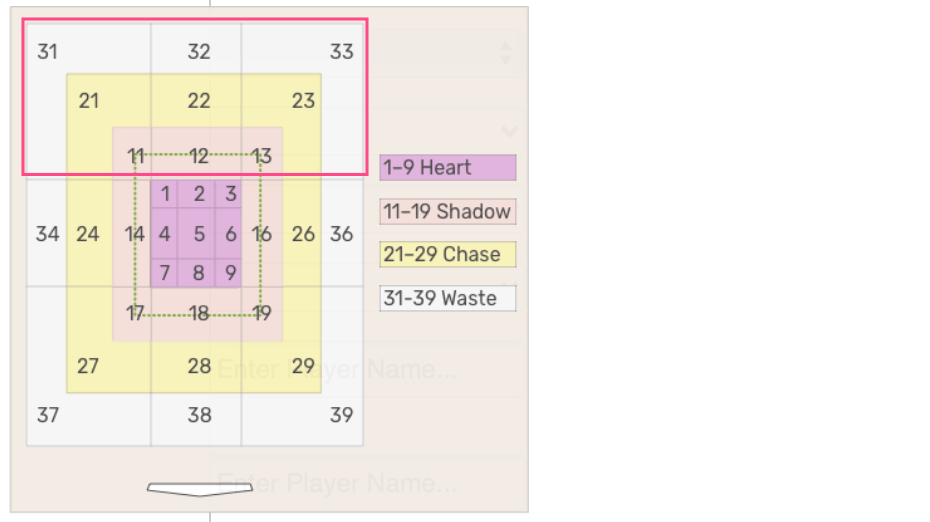
Using Statcast Search, I first investigated how many pitches in 2019 were in the upper portion of the Attack Zones. The graphic below from baseballsavant.com shows the nine zones in the “high-ball” area, zones 11-13, 21-23, and 31-33. All are above the heart zone, which is lavender-colored. The heart zone pictures the heart of the plate.

The first question to be researched is From 2017 to 2019, how many pitches were thrown in the “high-ball” area?

To answer it, these Statcast Settings were used:

  • Player Type: Pitcher
  • Group By: League and Year
  • Attack Zones: 11, 12, 13, 21, 22, 23, 31, 32, 33
  • Season: 2017, 2018, 2019
  • Season Type: Regular
YearPitchesTotalPitch %
1League201912300373247316.8
2League201811594472119016.1
3League201711111272124315.4
https://tinyurl.com/yb4mbtvk

Since 2017, the percentage of high-ball pitches increased from 15.4% to 16.8% as the number increased by 11,891. An unexpected result is that the total number of pitches also increased from 2017 to 2019 by 11,230, but that is a topic for another post.

Throwing balls high has its risks.

Sheinen’s article includes this Bud Black quote:

“It’s still dangerous throwing the ball up in the zone. That hasn’t changed,” said Colorado Rockies Manager Bud Black, a former pitcher. “You have to throw it at the right height. If you throw it too high they’ll take it [for a ball], but if you miss it low, they’ll crush it. It isn’t for everybody. There are pitchers whose style and stuff allows them to pitch up there, guys we identify as highball pitchers, and we encourage them.”

That led to the second question: In 2019 which pitchers took that risk the most and what were the results?

Revised Statcast Search Settings

  • Player Type: Pitcher
  • Group By: Player Name
  • Attack Zones: 11, 12, 13, 21, 22, 23, 31, 32, 33
  • Season: 2019
  • Season Type: Regular

Here are the top 10 pitchers in 2019 ordered by number of high-ball pitches they threw.

PlayerPitchesTotalPitch %
Trevor Bauer875368723.7
Gerrit Cole869336225.8
Jake Odorizzi826278729.6
Rick Porcello793296026.8
Steven Matz745270227.6
Justin Verlander745344821.6
Caleb Smith743266127.9
Reynaldo Lopez708316322.4
Jacob deGrom699329721.2
Jordan Lyles698245628.4
Source: baseballsavent.com

Minnesota Twins starter Jake Odorizzi led the Top 10 in high-ball percent, nudging 30%. Last season, he also had his personal bests in won-lost percentage (.682), strikeouts per nine innings (10.1), and wins (15). Surprisingly, his 2019 Pitch % of 29.6% was not his career high. In 2017 with the Rays it was 30.3%; however, his won-lost record was 10-8, so just keeping pitching high may not have been the main cause of his increased success in 2019. But that too is a topic for another post’s investigation.

Given that in 2019 Odorizzi’s improved by 114% the number of games he won in the previous season, did the other members of the Top 10 experience a similar gain?

Eight of the Top 10 won more games in 2019 than in 2018, Trevor Bauer failing to match his 2018 win total by one game though he started six more games, a league switch likely the cause. He had a winning record with the Indians, but then a losing one with the Reds. In addition, Rick Porcello had three fewer wins in 2019 though starting only one fewer games.

Player20182019
Trevor Bauer12-611-13
Gerrit Cole15-520-5
Jake Odorizzi7-1015-7
Rick Porcello17-714-12
Steven Matz5-1111-10
Justin Verlander16-921-6
Caleb Smith5-610-11
Reynaldo Lopez7-1010-15
Jacob deGrom10-911-8
Jordan Lyles3-412-8
Won-Lost records for Top 10 high-ball pitchers in 2019

To be continued

Statcast Search: Called Strikes

In 2019, which Met pitcher threw the most called strikes?

This post reveals how to find the answer using Statcast Search.

Settings

  • Pitch Result: Called Strike
  • Player Type: Pitcher
  • Team: Mets
  • Season: 2019
  • Season Type: Regular

You can view the Search Results here.

Noah Syndergaard threw the most called strikes — 3095.

Among the starters, was that the highest percentage of called strikes?

To answer that, change the Position setting to “SP.” In the Search Results, the Pitch % column contains the answer. If the column is not in descending order, click the column title until it is.

The starter with the highest percentage of pitches that were called strikes was Steven Matz. Of the 2,702 pitches he threw, 479 were called strikes. That is 17.7%.

Noah Syndergaard had the third highest called-strike percentage.

Free Baseball Book Not Just for Yankees Fans

I like to read books, especially baseball books, and today I found one that appears to be a standout. I say standout though I have only read about 8% of the book — according to the Kindle app — but at least I’m not judging it just by its cover. In fact, I don’t even remember what the cover looks like.

It’s written by Phil Pepe, a long-time sportswriter who covered the Yankees beat. He wrote for the World-Telegram and Sun, a New York newspaper that I once delivered by bicycle and the New York Daily News, a paper that had a great sports department until 2018 it downsized it from 30 to 9 and then in 2019 had the chutzpah to write a story headlined “The Sports Illustrated layoffs are disgraceful.”

But this post is not a bearer of bad news. Instead, it is about a company that deserves a shoutout: Sports Publishing.

Today, while browsing through Amazon’s baseball books I found Phil Pepe’s Yankee Doodles: Inside the Locker Room with Mickey, Yogi, Reggie, and Derek. Though published in 2015, the book is not dated. It’s about Yankees like Yogi Berra and Mickey Mantle, Yankee greats who played the game when baseball was still America’s pastime.

On its Amazon page, the book’s print list price of $24.99 is crossed out. Its Kindle price is not. It is $0.00.

That is not a typo.

I don’t know for how long it has been free nor for how long it will continue to be. What I do know is that it appears to be a great read. So even if you are not a Yankees fan, just being a sports fan is a good enough reason to treat yourself to this Sports Publishing giveaway.

Thank you Sports Publishing.

Exploring Baseball with R #1

Every year since 1956 at least one pitcher has won the Cy Young Award starting with the Brooklyn Dodgers’ Don Newcombe. Many questions can be asked. How many pitchers won the award more than once? Which pitchers achieved that feat? Who won it the most times?

In this post, I focus on just one question: How many players won the Cy Young Award? I will share how I got the answer using the R programming language. I will also be using both RStudio and Sean Lahman’s Baseball Database, an excellent resource. A basic familiarity with both R, dplyr, and RStudio is assumed. (Note: As you progress through this post, have RStudio open.)

Here is an introduction to the database.

The database contains multiple files in table format. The table containing the player awards data is AwardsPlayers.RData. It has six variables:

playerID       Player ID code
awardID        Name of award won
yearID         Year
lgID           League
tie            Award was a tie (Y or N)
notes          Notes about the award

What AwardsPlayers.RData does not have are the players’ names though it has each Player’s ID. Their names are in People.RData. The People table contains 24 variables. In the partial display of its variables, notice that it too contains playerID.

playerID       A unique code asssigned to each player.
birthYear      Year player was born
birthMonth     Month player was born
birthDay       Day player was born
birthCountry   Country where player was born
birthState     State where player was born
birthCity      City where player was born
nameFirst      Player's first name
nameLast       Player's last name
weight         Player's weight in pounds
height         Player's height in inches
bats           Player's batting hand (left, right, or both)        
throws         Player's throwing hand (left or right)

Fortunately, the playerID field links together the data in the tables.

For this tutorial, you need to download from Lahman’s database the “2019 – R Package“. When the webpage appears, click “data.”

You will see a list of downloadable files. The files are in RData format, a format created for use in R. For this tutorial, download these two files: AwardsPlayers.RData and People.RData. The latter is not shown in the image below, which contains a partial file list.

After you click AwardsPlayers.RData, what is shown below will appear. Click View Raw. The file will download to your device. (Note: The way I show you to do something in this tutorial is often not the only way to do it.)

Click the downloaded file, which in this case is AwardsPlayers.RData. On my Mac, it downloaded into the Downloads folder.

When this appears, click Yes.

This should appear in your RStudio Console:

load(“/Users/Home/Downloads/AwardsPlayers.RData”

Here is how the AwardsPlayers.RData looks in RStudio’s Global Environment. It is now available for you to work on.

Now, in RStudio the two downloaded tables are R data frames. Next, I created an R Markdown file and made copies of both data frames.

AP <- AwardsPlayers
P <- People

Merge AP and P into a new data frame: AP_P. The column common to both, playerID, serves as the link.

AP_P <- merge(AP, P, by="playerID")

View the merged data frame’s variables.

glimpse(AP_P)

To view the data, while in the Console type

View(AP_P).

Activate the Tidyverse library, reduce the number of columns, and display the last 10 rows. Note: If you have not used it before, you may need to install it using the R code on the next line.

install.packages("tidyverse")
library(tidyverse)
AP_P %>% select(nameFirst, nameLast, playerID, yearID, awardID) %>% tail(10)

Select five columns in AP_P, and display the last 10 rows in AP_P.

  nameFirst<chr>nameLast<chr>playerID<chr>yearID<int>awardID<chr>
6227RyanZimmermanzimmery012010Silver Slugger
6228RyanZimmermanzimmery012011Lou Gehrig Memorial Award
6229RyanZimmermanzimmery012009Silver Slugger
6230RichieZiskziskri011981TSN All-Star
6231RichieZiskziskri011974TSN All-Star
6232BarryZitozitoba012012Hutch Award
6233BarryZitozitoba012002Cy Young Award
6234BarryZitozitoba012002TSN Pitcher of the Year
6235BarryZitozitoba012002TSN All-Star
6236BenZobristzobribe012016World Series MVP

The next step is to combine the nameFirst and nameLast columns in a new column, fullname. The paste function automatically inserts a space between the names.

AP_P$fullname <- paste(AP_P$nameFirst, AP_P$nameLast)

The five columns to be displayed are selected and the last 15 observations in the AP_P data frame are displayed.

AP_P %>% select(playerID, fullname, awardID, yearID, lgID) %>% tail(15)
zimmery01Ryan ZimmermanLou Gehrig Memorial Award2011ML
zimmery01Ryan ZimmermanSilver Slugger2009NL
ziskri01Richie ZiskTSN All-Star1981AL
ziskri01Richie ZiskTSN All-Star1974NL
zitoba01Barry ZitoHutch Award2012ML
zitoba01Barry ZitoCy Young Award2002AL
zitoba01Barry ZitoTSN Pitcher of the Year2002AL
zitoba01Barry ZitoTSN All-Star2002AL
zobribe01Ben ZobristWorld Series MVP2016ML
In this table only the last eight observations are shown.

Go into the View window and set the settings you see below in the first row. Notice that the last year for the Cy Young Award is 2017, thus two years are missing.

Partial screenshot of View window

Add the missing data to the AP dataset.

AP <- add_row(AP, playerID = "degroja01", awardID = "Cy Young Award", yearID = 2018, lgID = "NL", tie = "NA", notes = "P")
AP <- add_row(AP, playerID = "snellwa01", awardID = "Cy Young Award", yearID = 2018, lgID = "AL", tie = "NA", notes = "P")
AP <- add_row(AP, playerID = "degroja01", awardID = "Cy Young Award", yearID = 2019, lgID = "NL", tie = "NA", notes = "P")
AP <- add_row(AP, playerID = "verlaju01", awardID = "Cy Young Award", yearID = 2019, lgID = "AL", tie = "NA", notes = "P")
AP <- add_row(AP, playerID = "verlaju01", awardID = "TSN All-Star", yearID = 2019, lgID = "AL", tie = "NA", notes = "P")
AP <- add_row(AP, playerID = "snellwa01", awardID = "TSN All-Star", yearID = 2018, lgID = "AL", tie = "NA", notes = "P")

Exercise: Update the AP_P data frame with the new data added to the AP dataset.

How many players won the Cy Young Award? After piping what is in the AP_P data frame to the select function, we filter it to limit the observations just to those players who won the Cy Young Award. That result is then sorted (in ascending order) and the number of observations in the awardID column are counted.

AP_P %>% select(playerID, fullname, yearID, lgID, awardID) %>% filter(awardID == "Cy Young Award") %>% arrange(yearID) %>% count(awardID)

Through 2019, 118 players have won the Cy Young.

If you find any errors in this post, please let me know. If you have any technical questions about R, please ask them on stackoverflow.com.